Why Is My Website Not on Google? 9 Reasons and the Fix for Each

You typed your domain into Google and your own site did not come back. Nine times out of ten the site is not banned or penalized. It is stuck in one specific, readable place between discovery, crawling and indexing, and Google Search Console already tells you which one. This guide walks the exact diagnosis: confirm the problem first, then decode the status Google shows you, then apply the one fix that status actually needs. It is written for site owners who are tired of resubmitting blindly.
Key takeaways#
- "Not on Google" almost always means "not indexed", and Search Console's Page Indexing report names the exact reason for every URL you care about. Diagnosis is a lookup, not a guess.
- The three stages are discovery, crawling and indexing. Submission only affects the first stage, so a page that stays out of the index has a crawl or eligibility problem, not a submission problem.
- Each Search Console status maps to one fix. Discovered means a crawl priority problem, noindex means a directive problem, soft 404 means a content problem. Resubmitting fixes none of those.
- Resubmitting helps exactly three cases: crawl budget stalls after a fix, fetch errors after the server recovers, and noindex pages after the tag is removed. For everything else it burns quota and changes nothing.
- A page can be indexed and still not rank. If site: search finds the page, indexing is not the problem, relevance is, and that is a different guide entirely.
- First, confirm what "not on Google" means
- The three stages every page passes through
- Decode your Search Console status
- Discovered, currently not indexed
- Crawled, currently not indexed
- Excluded by noindex tag
- Alternate page with proper canonical
- Duplicate without user-selected canonical
- Soft 404
- Page with redirect
- Blocked by robots.txt
- Not found 404 and server errors
- How long each fix takes to show up
- When resubmitting actually helps
- FAQ
First, confirm what "not on Google" means#
Before fixing anything, separate the three problems people mix together, because they have different fixes.
Not indexed. The page is not in Google's index at all. Check with a site: query: search for site:example.com/services/ using your own domain and path. If nothing comes back, the page is not indexed. This guide is for you.
Indexed but not ranking. The site: query finds the page, but it never appears for the keywords you care about. Indexing is working, relevance is not. That is a content and competition problem, not an indexing problem, and no amount of resubmission will move a page from position 40 to position 4.
Indexed yesterday, gone today. The page was in the index and dropped out. Check the Page Indexing report for a new status, and check Search Console messages for manual actions. Pages do get dropped after quality re-evaluation, redirects or site moves, and the report usually says which.
One more confirmation worth doing: search from an incognito window or another device. Personalized results and local intent hide pages that are perfectly indexed, especially when you search your exact brand name and expect your deepest landing page instead of your homepage.
The three stages every page passes through#
Every indexed page on the web passed through the same three gates, in order.
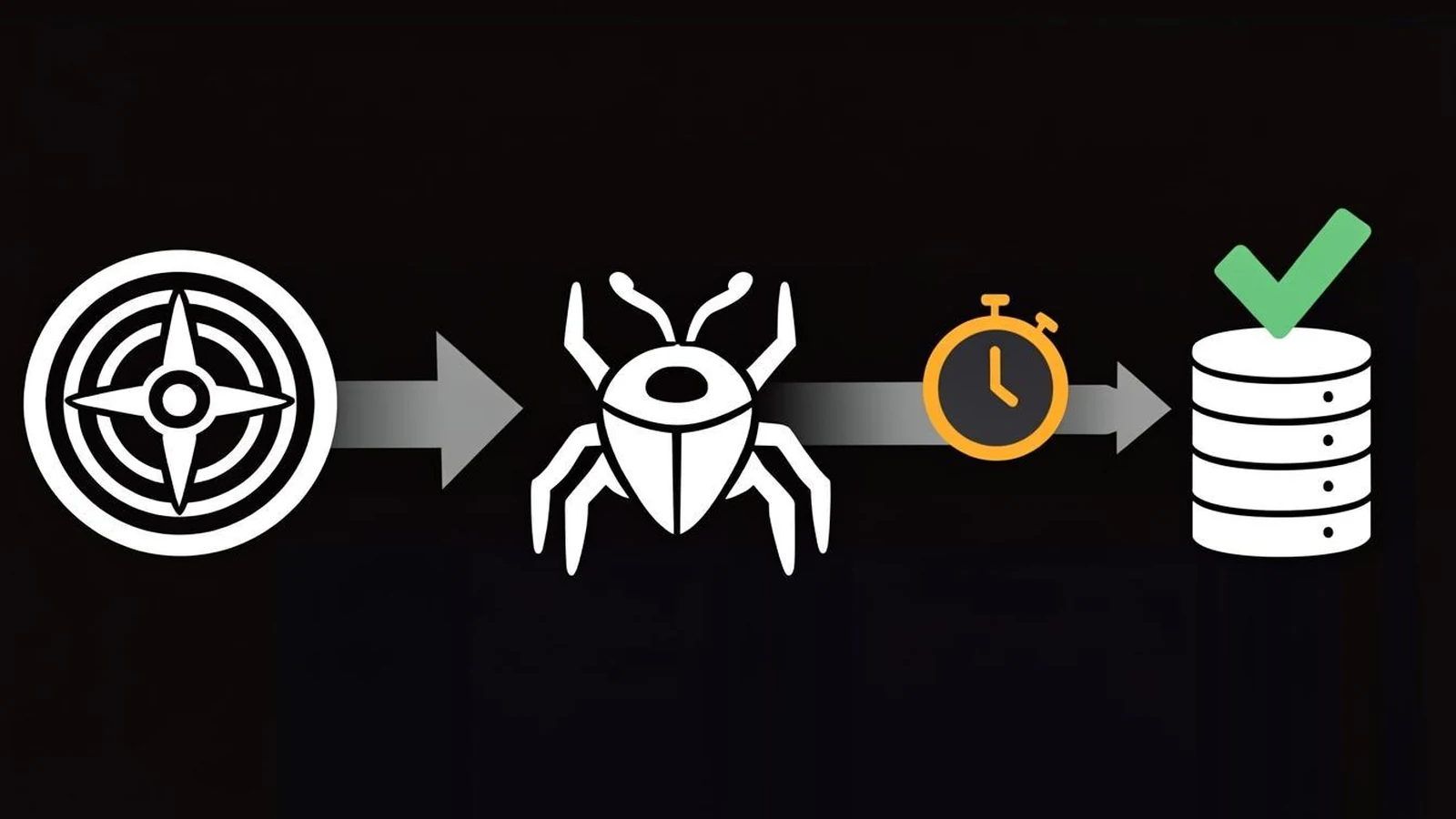
Discovery means Google has learned the URL exists, from a sitemap, an internal link, an external link or a submission. Crawling means Googlebot actually fetched the page. Indexing means Google decided to include the fetched page in its index after checking eligibility: not blocked, not redirected, not a duplicate, not thin.
Here is the part that matters for diagnosis: each stage can fail independently, and each failure has a different fix. A page can be discovered but never crawled, crawled but not indexed, or indexed then dropped. When someone says "my site is not on Google", they are usually describing one of those three stalls, and the fix depends on which one it is.
Submission tools, including this one, only feed the first gate. They can ask Google to crawl sooner. They cannot make Google index a page it has judged not worth indexing, and any tool that promises otherwise is selling you something Google's own documentation contradicts.
Decode your Search Console status#
The Page Indexing report in Search Console assigns every known URL of your property a status. The wording Google uses is precise once you learn to read it, and the status itself points at the fix.
Verdict decoder
Find the status Search Console shows you
Pick the wording from the Page Indexing report or the URL Inspection tool. The decoder explains what it means, what to check, and whether submitting the URL again can help.
Pick a status above to decode it.
The nine diagnosis classes, with the fix for each, are collected in the verdict reference.
The decoder above is the short version. The rest of this guide walks each status in depth, with the checks, the fix and the honest answer on whether submitting the URL again helps.
Discovered, currently not indexed#
What it means. Google knows the URL exists but has never fetched the page. The URL is in a sitemap or linked somewhere, and Google has decided that with everything else it has to crawl on your site and every other site, fetching this page is not currently a priority.
What to check. Internal links are the first thing to look at. A page one click from the homepage gets crawled far sooner than a page five clicks deep. Then check whether the page is in your sitemap, whether the site has thousands of low value URLs competing for the same crawl budget, and whether the site is slow. All three push this page further down Google's queue.
The fix. Strengthen the internal links to the page, keep it in the sitemap, and cut the URLs that waste crawl budget: parameter duplicates, filtered facets, thin tag pages. On a large site this is the single highest leverage indexing fix there is. Submitting the URL through the Google Indexing API or Request Indexing can also bump its priority, which is exactly the legitimate use case for submission tools.
Does resubmitting help? Yes, this is the status submission is built for. Give the crawl some time after submitting, days to a couple of weeks, before judging the result.
Crawled, currently not indexed#
What it means. Google fetched the page, read it, and chose not to index it. This is Google making a quality judgment, or at minimum a value judgment, and it is the hardest status to hear about your own page.
What to check. Compare the page against others like it on your site. Is the content substantially original, or does it restate what ten other pages already say? Is it thin, a few hundred words of template with a paragraph of actual content? Does it duplicate another URL on your own site with slightly different wording? For a new site with no external links, some pages sit in this state for weeks before Google trusts them enough to index.
The fix. Improve the page or consolidate it. Merging three thin near-duplicates into one genuinely useful page does more for indexing than any submission. If the page matters commercially, add unique value the competitors do not have: original data, worked examples, better answers to the questions buyers actually ask.
Does resubmitting help? Not until the page changes. Resubmitting an unchanged page that Google already read and declined wastes quota. Improve it first, then submit again.
Excluded by noindex tag#
What it means. The page is telling Google not to index it, through a robots meta tag in the head or an X-Robots-Tag HTTP header. Google is honoring that request, exactly as it should.
What to check. View the page source and search for noindex. Check the HTTP headers too, because a header can come from the server, a plugin or a CDN rule rather than the page itself. The classic sources: a staging flag that shipped to production, a WordPress "discourage search engines" box that is still checked, a template that carries the tag onto every page using it, a security plugin reacting to a perceived threat.
The fix. Remove the directive at its source. If the tag was there for a while, expect the recrawl to take days to weeks, and submitting the page after removal speeds that up.
Does resubmitting help? Yes, but only after the tag is gone. Submitting while the directive is still in place achieves nothing, and no indexing tool can or should override a deliberate noindex.
Alternate page with proper canonical#
What it means. This URL declares another URL as its canonical version, Google agreed, and Google indexes that other URL instead. The page is deliberately consolidated.
What to check. Whether the chosen canonical is the one you actually wanted. Open the page source and read the rel="canonical" tag. Check for redirect chains that end somewhere unexpected, and for canonical tags that a plugin or template set automatically and got wrong. A printer friendly version, a parameter URL or an https versus http mismatch can silently steal the canonical away from the page you care about.
The fix. None, if the canonical is correct: this is a healthy state, not an error. Google keeping one version of a group of duplicates is exactly what canonicals are for. If the canonical points at the wrong URL, fix the tag on the page, then submit the page again.
Does resubmitting help? No, unless you fixed a wrong canonical first. This is a decision Google made, not a failure to fetch.
Duplicate without user-selected canonical#
What it means. Google found several near-identical pages and picked one to index on its own, without you declaring a preference. The chosen version might not be the one you wanted.
What to check. What Google chose as the indexed version: the Page Indexing report links the duplicates to it. Then look at why the duplicates exist at all: parameter URLs, sorted or filtered views, regional or device variants, boilerplate pages that differ by one line.
The fix. Declare your preference with a canonical tag on each duplicate, or make the pages genuinely different, or return 301 redirects if the duplicates serve no purpose. For faceted URLs, decide whether crawl rules in robots.txt should stop Google from even discovering them.
Does resubmitting help? Not directly. The duplicates are the problem, and consolidation is the fix. Submitting the duplicate again just reminds Google it exists.
Soft 404#
What it means. The URL returns a success status code, usually 200, but the content behaves like an error page: an empty category, an expired listing, a page with almost nothing on it. Google's judgment, not your server's, is what counts here.
What to check. Whether the page genuinely has content that serves a real user. Expired campaigns, emptied categories after products were removed, archive pages whose source pages were deleted, and thin tag pages are the usual sources. Load the URL with JavaScript off, too, because Googlebot's first fetch is of the raw HTML.
The fix. Either return a real 404 or 410 status, which is the correct behavior for a genuinely gone page, or put real content on the page. The 410 especially helps Google drop the URL from its crawl schedule faster than a 404 does.
Does resubmitting help? No. Resubmitting a soft 404 tells Google the same page it already declined is still soft. Fix the content or the status code, and the next natural or requested crawl resolves it.
Page with redirect#
What it means. The URL redirects to another URL, so Google indexes the target and excludes the source. If you deliberately redirected this URL, this status is the system working.
What to check. The redirect target and its type. A 301 passes value to the destination, while 302s are treated as temporary and keep the source indexed in some cases. Watch for redirect chains, where the target itself redirects again, and for accidental mass redirects, like a site rule that swallows a whole path segment into the homepage.
The fix. None if the redirect is intentional. If it is not, remove or correct the redirect rule, then submit the source URL again.
Does resubmitting help? No, and it is not supposed to. Google indexing the redirect target is the correct, documented behavior for redirects.
Blocked by robots.txt#
What it means. A rule in robots.txt forbids Googlebot from fetching the URL. Google can still know the URL exists, from links to it, but it will not fetch it, and without fetching there is nothing to index.
What to check. The robots.txt file itself, line by line. Look for overly broad patterns like a Disallow: / left from development, a path block that matches more than intended, or rules written for the wrong user agent. The robots.txt report in Search Console tests any single URL against the current file and shows the matching rule.
The fix. Allow the path in robots.txt. Then be patient: because Google never fetched the page while it was blocked, it can take days to weeks before the next crawl, so submitting the URL after the rule change genuinely speeds things up.
Does resubmitting help? Yes, after the rule is fixed. While the rule is in place, submission has no effect at all.
Not found 404 and server errors#
What it means. Either the URL returns a real 404, or the server fails with a 5xx error when Googlebot tries to fetch. In both cases Google tried and the fetch did not produce a page.
What to check. For 404s, whether the page is supposed to exist: a wrong internal link, a sitemap entry for a deleted page, a typo in a URL. The sitemap is worth auditing here, because a sitemap full of 404s trains Google to trust your sitemap less. For 5xx errors, check server logs around the timestamps Google reports, look for traffic spikes, slow queries or crashed workers at exactly those times, and test the URL yourself repeatedly during the windows the errors cluster in.
The fix. For 404s, fix the link, restore the page or remove it from the sitemap. For 5xx errors, fix the server side: the crashing code, the exhausted resources, the timeout. Fetch errors clear on the next successful crawl after the fix.
Does resubmitting help? Yes, once the page actually loads. Submitting a URL that still 404s or 500s just confirms the failure.
How long each fix takes to show up#
Expectations matter, because most "fixes" get abandoned one day before they would have worked. After the fix is genuinely in place:
- Noindex removed, robots.txt allowed: the next fetch has to happen first, then indexing follows. Typically days to two weeks, faster if you request indexing.
- Crawl budget improvements: Google's crawl scheduling relaxes gradually. Watch the trend over weeks, not days.
- Content improvements on crawled, not indexed pages: Google re-evaluates on its own schedule, and there is no instant re-judgment. Weeks is the honest unit.
- Consolidations and redirects: Google processes them on its own crawl schedule for each URL involved.
- After an Indexing API submission: in a recorded test documented on this site, six submitted URLs were checked again roughly two days later. That is one test on one site, not a promise, but it is a realistic anchor for what "faster" means.
When resubmitting actually helps#
Pull the whole guide together into one decision rule.
| Situation | Submit again? |
|---|---|
| Discovered, not indexed, page already fine | Yes, that is the exact use case |
| Fetch or server error, now fixed | Yes |
| Noindex removed, robots.txt now allows | Yes, to prompt the recrawl |
| Crawled, not indexed, page unchanged | No, improve the page first |
| Soft 404, content unchanged | No |
| Redirect or correct canonical | No, indexing the target is correct |
If you manage many URLs, doing this one at a time in Search Console is slow by design: Request Indexing has a daily quota measured in single URLs for a property. That quota exists so that manual requests stay manual. Submitting at any real scale calls for the Google Indexing API with your own service account, which is what Indexer automates, together with reading back the inspection verdict for every submitted URL so the table above stops being something you check by hand. The documentation covers the full setup from signup to first verdict, and the verdict reference includes what Indexer does with each one.
There is an honest limit worth stating plainly: no tool can force Google to index a page, this one included. What a workflow buys you is speed on the parts that are mechanical, and evidence on the parts that are judgment calls. The pages that get in are the ones that deserve to, and the pages that never will at least tell you why.
FAQ#
Why is only my homepage on Google?#
Almost always a crawl reach problem. The homepage is the best linked page on any site, so it is always fetched first. If nothing deeper is indexed, look for a sitewide cause: a noindex tag on an inner template, a robots.txt rule that blocks more paths than intended, or an internal linking structure where important pages are only reachable through JavaScript menus Googlebot does not execute on first fetch. Submit a few deep pages directly and watch which statuses come back, because the pattern of the statuses is the diagnosis.
Why did my page disappear from Google after being indexed?#
Check the Page Indexing report for the URL's new status, because something changed. The common ones: the page now redirects, a canonical was added pointing elsewhere, a noindex directive appeared, the server started failing for crawlers, or Google re-evaluated the page's quality after an algorithm update. Less commonly, a manual action, which Search Console would message you about. The fix is whatever the new status says it is, not a resubmission.
Why does site: search show my page but normal search does not?#
Because the page is indexed but does not rank for that query, which is relevance, not indexing. Google has the page, has judged it, and is choosing to show other pages above it. Improving the content, its internal linking and its external evidence is the path. Resubmitting an indexed page accomplishes nothing, it is already in the index that submission feeds.
Should I resubmit the same URL every day?#
No. Resubmission is a request, and repeating the request does not raise its priority, it just spends quota that other, genuinely new or genuinely fixed URLs could use. If a page was submitted, is fetchable, is eligible, and still is not indexed after a couple of weeks, the answer is almost never more submissions. It is one of the nine statuses in this guide, and each has one fix.
Further reading#
- The Indexer documentation: the same workflow, documented click by click with a worked example domain
- Google Indexing API Errors and Quotas: Every Fix
- How to Index Your Website on Google: The 2026 Guide
- 404s in Your Sitemap: The Silent Indexing Killer
- Alternate Page with Proper Canonical: Should You Fix It?
- Backlink Indexers Explained: How They Work and When to Use Them
- BYOK Explained: Why Bring-Your-Own-Key SaaS Is Taking Over
- Google Indexing API Setup: From Cloud Console to First Submit
- AI Overviews and Your Traffic: How to Adapt
- Answer Engine Optimization (AEO) vs. GEO vs. SEO
- IndexNow Explained: the Protocol, Key and Engines
- Search Console Verification: Every Method Compared
- Sitemap XML Explained: Format, Limits and Lastmod