API Key Rotation: A Practical Guide for SEO Teams

Keys expire, leak, or need replacement after staff changes, and rotation day is when most indexing pipelines break. A practical api key rotation plan keeps Google service account keys and IndexNow keys fresh without losing URL submissions or causing quota errors. This guide is for SEO teams, developers, and owners who run daily submission jobs and want a repeatable process. You will learn how often to rotate each key type, how to overlap old and new keys for zero downtime, how to update cron jobs and deploy pipelines, how to test after each swap, and how to log every change for audit. The focus is api key rotation, and you will finish with a calendar template you can copy. Each recommendation below uses plain steps, named roles, and checks you can verify in provider consoles and tool logs. You do not need enterprise software to follow along. A small team with one vault, one log sheet, and one calendar can run the full pattern. Work through sections in order the first time, then reuse individual sections as checklists during reviews and incidents.
Key takeaways
- Limits damage from silent leaks across one scoped project keeps control clear.
- Ticket template for swap shows true cost before you scale volume.
- Store secrets in a vault with roles, rotate on schedule, and log every use.
- Test small batches first, then expand after clean results and steady logs.
- Why API key rotation matters for SEO teams
- How often to rotate different key types
- Zero downtime rotation in five steps
- Rotating Google service account keys
- Rotating IndexNow keys without losing submissions
- Automating rotation reminders and jobs
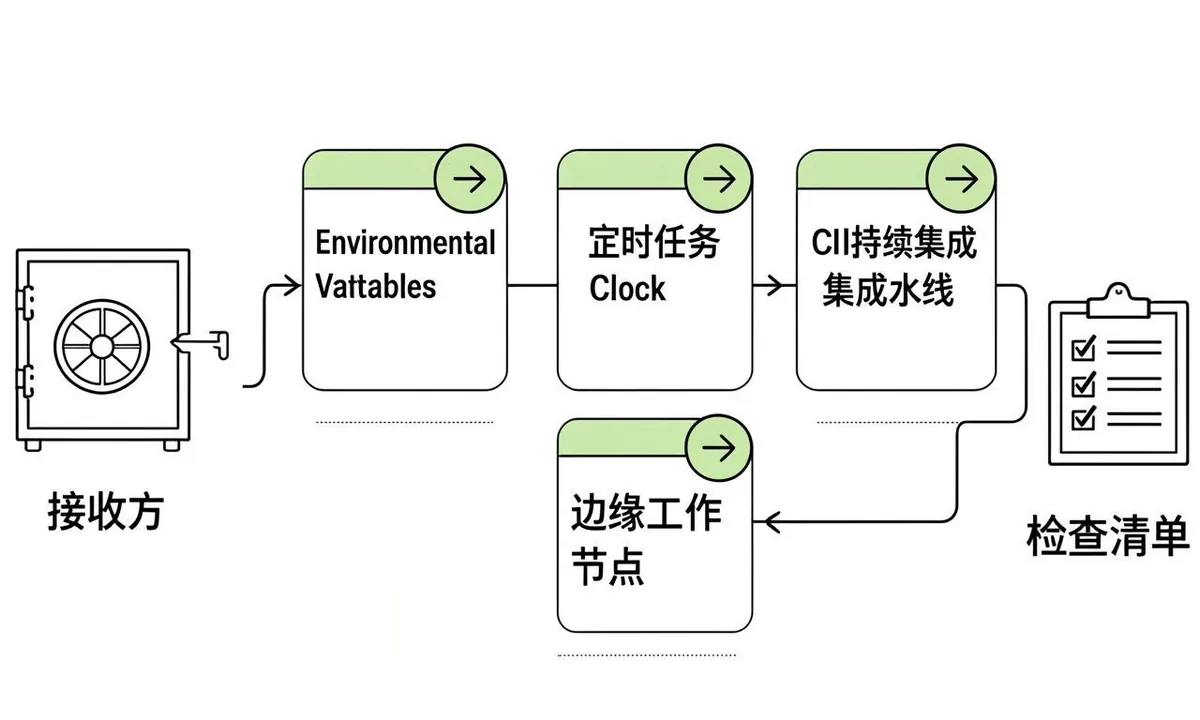
- Updating apps, cron, and deploy pipelines
- Testing after every rotation
- Handling failures during rotation
- Logging and audit trail for rotations
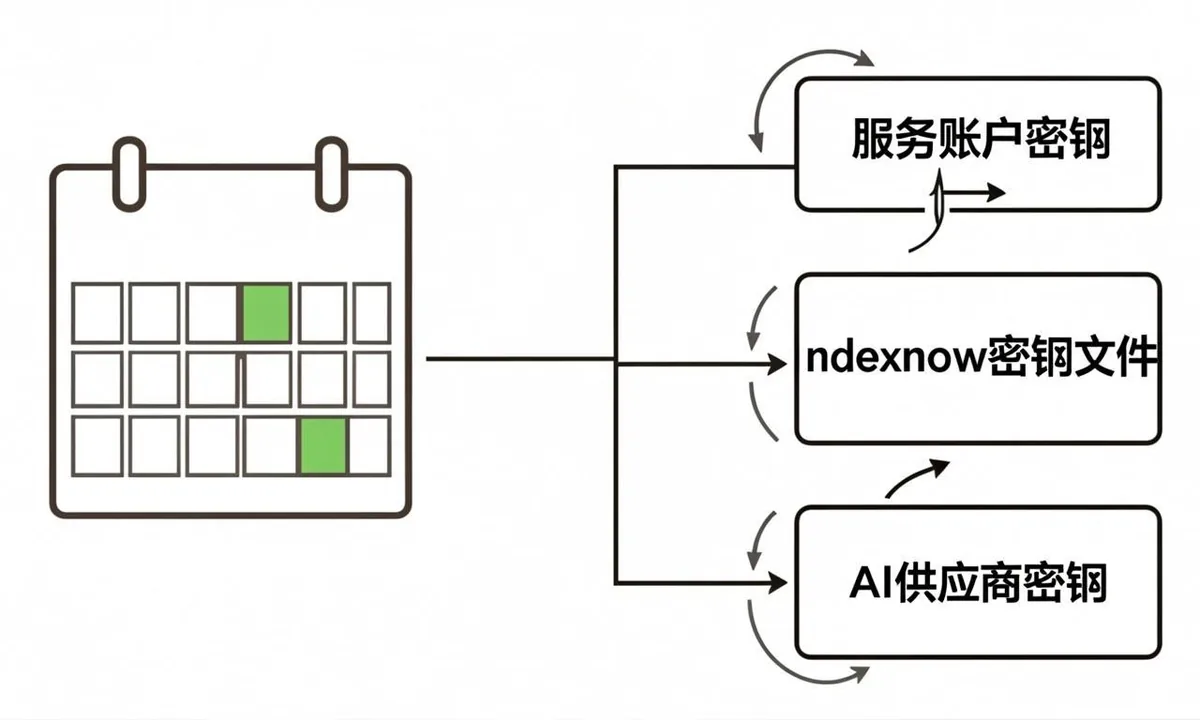
- Rotation calendar template for small teams
- FAQ

Why API key rotation matters for SEO teams
Why rotation matters for SEO teams deserves a plain definition before you act, because api key rotation fails most often from vague ownership rather than hard technology. In this workflow you are the customer of the provider and the user of the tool, which means two dashboards matter: the provider console where quota and keys live, and the tool dashboard where jobs run. Start by naming the exact outcome you want, such as daily URL submissions under your own quota or predictable spend per project. Write that outcome in one sentence in your runbook. When everyone agrees on the outcome, later choices about scope, project separation, and logging become straightforward and easy to audit.
- Limits damage from silent leaks. In the context of api key rotation, this step protects quota, clarifies ownership, and keeps logs readable for the next review.
- Keeps ex staff access closed. In the context of api key rotation, this step protects quota, clarifies ownership, and keeps logs readable for the next review.
- Meets client and audit expectations. In the context of api key rotation, this step protects quota, clarifies ownership, and keeps logs readable for the next review.
- Prevents quota surprises. In the context of api key rotation, this step protects quota, clarifies ownership, and keeps logs readable for the next review.
- Builds trust with vendors. In the context of api key rotation, this step protects quota, clarifies ownership, and keeps logs readable for the next review.
Why does why rotation matters for seo teams matter for teams running api key rotation every week? Because small errors compound at scale. A key with too broad a role can touch projects it should never see. A missing log row turns a simple 403 into a day of guessing. A test job pointed at production can burn a full day of quota before lunch. Owners feel this as delayed launches and surprise costs. Developers feel it as noisy alerts and late fixes. A clear pattern for why rotation matters for seo teams removes that friction. You get faster reviews, calmer incidents, and numbers you can explain to clients without hedging.
To apply why rotation matters for seo teams in your api key rotation workflow, follow a short repeatable loop. First, inventory the current state: which keys exist, where each one is stored, which scopes each one grants, and which jobs use it. Second, narrow scope to the minimum that still completes the job, using separate projects for production and testing. Third, move secrets into a vault with role based access and inject them at runtime instead of copying files. Fourth, run a small batch of five to ten real tasks and confirm response codes, log rows, and cost. Fifth, document the result with dates and owners so the next person does not start from zero.
A common mistake with why rotation matters for seo teams is treating it as a one time setup instead of a living control. Teams paste a key once, forget where copies live, and only revisit the topic after an auth failure or quota alert. The fix is a light routine: review scopes quarterly, confirm rotation dates on a shared calendar, check logs weekly at first then monthly, and test recovery steps before you need them. If you run api key rotation across client sites, add per client notes so one incident never spreads across accounts. This steady rhythm takes less than an hour a month and prevents most urgent fixes.
Teams that rotate api keys every quarter catch stale configs before launches and reduce surprise auth errors. A clear key rotation schedule with owners and due dates keeps the habit calm instead of urgent.
How often to rotate different key types
How often to rotate different key types deserves a plain definition before you act, because api key rotation fails most often from vague ownership rather than hard technology. In this workflow you are the customer of the provider and the user of the tool, which means two dashboards matter: the provider console where quota and keys live, and the tool dashboard where jobs run. Start by naming the exact outcome you want, such as daily URL submissions under your own quota or predictable spend per project. Write that outcome in one sentence in your runbook. When everyone agrees on the outcome, later choices about scope, project separation, and logging become straightforward and easy to audit.
- Google service keys every 90 days. In the context of api key rotation, this step protects quota, clarifies ownership, and keeps logs readable for the next review.
- IndexNow keys every 180 days. In the context of api key rotation, this step protects quota, clarifies ownership, and keeps logs readable for the next review.
- AI provider keys every 60 to 90 days. In the context of api key rotation, this step protects quota, clarifies ownership, and keeps logs readable for the next review.
- Rotate on staff exit same day. In the context of api key rotation, this step protects quota, clarifies ownership, and keeps logs readable for the next review.
- Rotate on any exposure at once. In the context of api key rotation, this step protects quota, clarifies ownership, and keeps logs readable for the next review.
Why does how often to rotate different key types matter for teams running api key rotation every week? Because small errors compound at scale. A key with too broad a role can touch projects it should never see. A missing log row turns a simple 403 into a day of guessing. A test job pointed at production can burn a full day of quota before lunch. Owners feel this as delayed launches and surprise costs. Developers feel it as noisy alerts and late fixes. A clear pattern for how often to rotate different key types removes that friction. You get faster reviews, calmer incidents, and numbers you can explain to clients without hedging.
To apply how often to rotate different key types in your api key rotation workflow, follow a short repeatable loop. First, inventory the current state: which keys exist, where each one is stored, which scopes each one grants, and which jobs use it. Second, narrow scope to the minimum that still completes the job, using separate projects for production and testing. Third, move secrets into a vault with role based access and inject them at runtime instead of copying files. Fourth, run a small batch of five to ten real tasks and confirm response codes, log rows, and cost. Fifth, document the result with dates and owners so the next person does not start from zero.
A common mistake with how often to rotate different key types is treating it as a one time setup instead of a living control. Teams paste a key once, forget where copies live, and only revisit the topic after an auth failure or quota alert. The fix is a light routine: review scopes quarterly, confirm rotation dates on a shared calendar, check logs weekly at first then monthly, and test recovery steps before you need them. If you run api key rotation across client sites, add per client notes so one incident never spreads across accounts. This steady rhythm takes less than an hour a month and prevents most urgent fixes.
| Check | What good looks like for api key rotation |
|---|---|
| Scope | Least privilege on one project, test separated from prod |
| Storage | Vault with roles and MFA, no raw files in chat |
| Logging | Key fingerprint, time in UTC, code, and cost per call |
| Recovery | Overlap window, rollback version, owner on call |
Use this table during reviews. If any row is unclear for how often to rotate different key types, pause and fix that row before scaling volume. Clear rows now mean fewer incidents later, and each row maps directly to a line in your runbook.
To rotate google api key material for service accounts, plan ninety day cycles and faster swaps on staff exit or suspected exposure. Treat credential rotation as a normal deploy with staging tests and per project notes.
Zero downtime rotation in five steps
Zero downtime rotation in five steps deserves a plain definition before you act, because api key rotation fails most often from vague ownership rather than hard technology. In this workflow you are the customer of the provider and the user of the tool, which means two dashboards matter: the provider console where quota and keys live, and the tool dashboard where jobs run. Start by naming the exact outcome you want, such as daily URL submissions under your own quota or predictable spend per project. Write that outcome in one sentence in your runbook. When everyone agrees on the outcome, later choices about scope, project separation, and logging become straightforward and easy to audit.
- Generate new key alongside old. In the context of api key rotation, this step protects quota, clarifies ownership, and keeps logs readable for the next review.
- Update vault, keep old active. In the context of api key rotation, this step protects quota, clarifies ownership, and keeps logs readable for the next review.
- Deploy to staging first. In the context of api key rotation, this step protects quota, clarifies ownership, and keeps logs readable for the next review.
- Switch prod jobs one by one. In the context of api key rotation, this step protects quota, clarifies ownership, and keeps logs readable for the next review.
- Delete old key after green period. In the context of api key rotation, this step protects quota, clarifies ownership, and keeps logs readable for the next review.
Why does zero downtime rotation in five steps matter for teams running api key rotation every week? Because small errors compound at scale. A key with too broad a role can touch projects it should never see. A missing log row turns a simple 403 into a day of guessing. A test job pointed at production can burn a full day of quota before lunch. Owners feel this as delayed launches and surprise costs. Developers feel it as noisy alerts and late fixes. A clear pattern for zero downtime rotation in five steps removes that friction. You get faster reviews, calmer incidents, and numbers you can explain to clients without hedging.
To apply zero downtime rotation in five steps in your api key rotation workflow, follow a short repeatable loop. First, inventory the current state: which keys exist, where each one is stored, which scopes each one grants, and which jobs use it. Second, narrow scope to the minimum that still completes the job, using separate projects for production and testing. Third, move secrets into a vault with role based access and inject them at runtime instead of copying files. Fourth, run a small batch of five to ten real tasks and confirm response codes, log rows, and cost. Fifth, document the result with dates and owners so the next person does not start from zero.
A common mistake with zero downtime rotation in five steps is treating it as a one time setup instead of a living control. Teams paste a key once, forget where copies live, and only revisit the topic after an auth failure or quota alert. The fix is a light routine: review scopes quarterly, confirm rotation dates on a shared calendar, check logs weekly at first then monthly, and test recovery steps before you need them. If you run api key rotation across client sites, add per client notes so one incident never spreads across accounts. This steady rhythm takes less than an hour a month and prevents most urgent fixes.
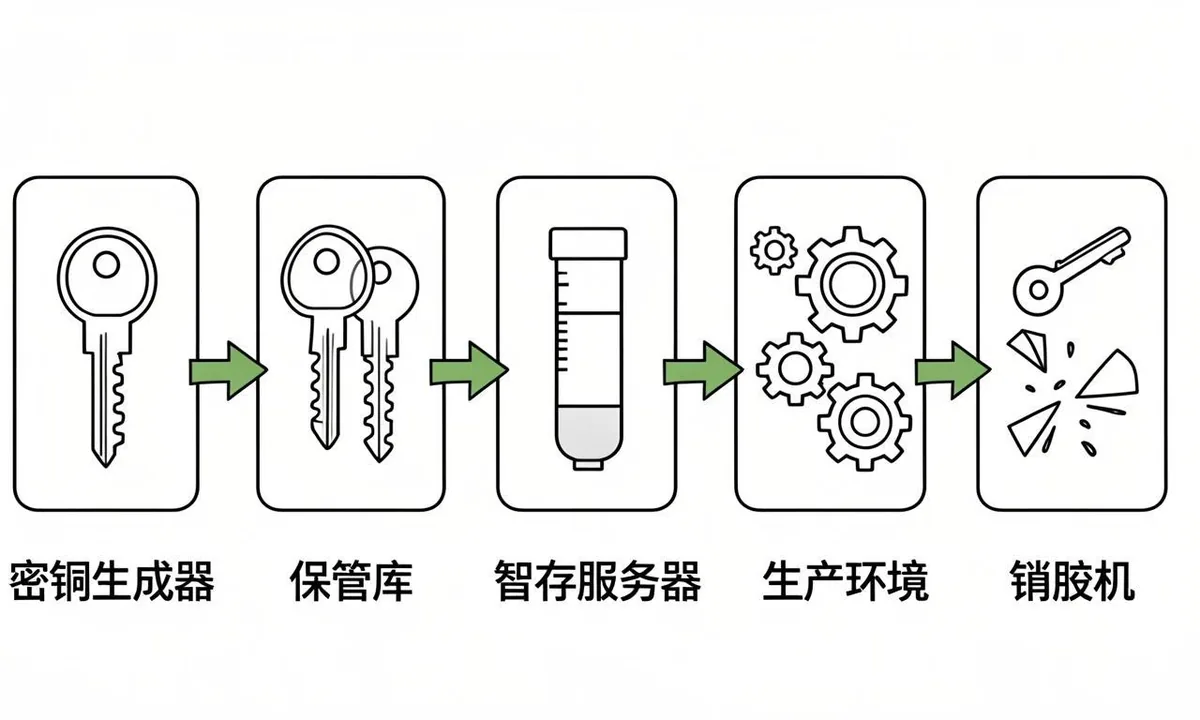
A safe key rotation keeps the old key valid while you deploy the new one so queued jobs never fail. Follow key change best practices by keeping overlap brief, logging key IDs and dates, and verifying with a live test request before deletion.
Rotating Google service account keys
Rotating Google service account keys deserves a plain definition before you act, because api key rotation fails most often from vague ownership rather than hard technology. In this workflow you are the customer of the provider and the user of the tool, which means two dashboards matter: the provider console where quota and keys live, and the tool dashboard where jobs run. Start by naming the exact outcome you want, such as daily URL submissions under your own quota or predictable spend per project. Write that outcome in one sentence in your runbook. When everyone agrees on the outcome, later choices about scope, project separation, and logging become straightforward and easy to audit.
- Create second key in same project. In the context of api key rotation, this step protects quota, clarifies ownership, and keeps logs readable for the next review.
- Add to Search Console if new email. In the context of api key rotation, this step protects quota, clarifies ownership, and keeps logs readable for the next review.
- Update Secret Manager version. In the context of api key rotation, this step protects quota, clarifies ownership, and keeps logs readable for the next review.
- Redeploy workers and cron. In the context of api key rotation, this step protects quota, clarifies ownership, and keeps logs readable for the next review.
- Test publish then remove old. In the context of api key rotation, this step protects quota, clarifies ownership, and keeps logs readable for the next review.
Why does rotating google service account keys matter for teams running api key rotation every week? Because small errors compound at scale. A key with too broad a role can touch projects it should never see. A missing log row turns a simple 403 into a day of guessing. A test job pointed at production can burn a full day of quota before lunch. Owners feel this as delayed launches and surprise costs. Developers feel it as noisy alerts and late fixes. A clear pattern for rotating google service account keys removes that friction. You get faster reviews, calmer incidents, and numbers you can explain to clients without hedging.
To apply rotating google service account keys in your api key rotation workflow, follow a short repeatable loop. First, inventory the current state: which keys exist, where each one is stored, which scopes each one grants, and which jobs use it. Second, narrow scope to the minimum that still completes the job, using separate projects for production and testing. Third, move secrets into a vault with role based access and inject them at runtime instead of copying files. Fourth, run a small batch of five to ten real tasks and confirm response codes, log rows, and cost. Fifth, document the result with dates and owners so the next person does not start from zero.
A common mistake with rotating google service account keys is treating it as a one time setup instead of a living control. Teams paste a key once, forget where copies live, and only revisit the topic after an auth failure or quota alert. The fix is a light routine: review scopes quarterly, confirm rotation dates on a shared calendar, check logs weekly at first then monthly, and test recovery steps before you need them. If you run api key rotation across client sites, add per client notes so one incident never spreads across accounts. This steady rhythm takes less than an hour a month and prevents most urgent fixes.
When rotating service accounts across client projects, work one project at a time and confirm quota charts before moving on. After the swap, update api credentials in vaults, cron, CI variables, and local test files, then search for the old key ID to catch hidden copies.
Rotating IndexNow keys without losing submissions
Rotating IndexNow keys without losing submissions deserves a plain definition before you act, because api key rotation fails most often from vague ownership rather than hard technology. In this workflow you are the customer of the provider and the user of the tool, which means two dashboards matter: the provider console where quota and keys live, and the tool dashboard where jobs run. Start by naming the exact outcome you want, such as daily URL submissions under your own quota or predictable spend per project. Write that outcome in one sentence in your runbook. When everyone agrees on the outcome, later choices about scope, project separation, and logging become straightforward and easy to audit.
- Generate new hex key string. In the context of api key rotation, this step protects quota, clarifies ownership, and keeps logs readable for the next review.
- Host old and new txt files briefly. In the context of api key rotation, this step protects quota, clarifies ownership, and keeps logs readable for the next review.
- Update submitter config to new key. In the context of api key rotation, this step protects quota, clarifies ownership, and keeps logs readable for the next review.
- Verify 200 or 202 responses. In the context of api key rotation, this step protects quota, clarifies ownership, and keeps logs readable for the next review.
- Remove old txt after crawl. In the context of api key rotation, this step protects quota, clarifies ownership, and keeps logs readable for the next review.
Why does rotating indexnow keys without losing submissions matter for teams running api key rotation every week? Because small errors compound at scale. A key with too broad a role can touch projects it should never see. A missing log row turns a simple 403 into a day of guessing. A test job pointed at production can burn a full day of quota before lunch. Owners feel this as delayed launches and surprise costs. Developers feel it as noisy alerts and late fixes. A clear pattern for rotating indexnow keys without losing submissions removes that friction. You get faster reviews, calmer incidents, and numbers you can explain to clients without hedging.
To apply rotating indexnow keys without losing submissions in your api key rotation workflow, follow a short repeatable loop. First, inventory the current state: which keys exist, where each one is stored, which scopes each one grants, and which jobs use it. Second, narrow scope to the minimum that still completes the job, using separate projects for production and testing. Third, move secrets into a vault with role based access and inject them at runtime instead of copying files. Fourth, run a small batch of five to ten real tasks and confirm response codes, log rows, and cost. Fifth, document the result with dates and owners so the next person does not start from zero.
A common mistake with rotating indexnow keys without losing submissions is treating it as a one time setup instead of a living control. Teams paste a key once, forget where copies live, and only revisit the topic after an auth failure or quota alert. The fix is a light routine: review scopes quarterly, confirm rotation dates on a shared calendar, check logs weekly at first then monthly, and test recovery steps before you need them. If you run api key rotation across client sites, add per client notes so one incident never spreads across accounts. This steady rhythm takes less than an hour a month and prevents most urgent fixes.
| Check | What good looks like for api key rotation |
|---|---|
| Scope | Least privilege on one project, test separated from prod |
| Storage | Vault with roles and MFA, no raw files in chat |
| Logging | Key fingerprint, time in UTC, code, and cost per call |
| Recovery | Overlap window, rollback version, owner on call |
Use this table during reviews. If any row is unclear for rotating indexnow keys without losing submissions, pause and fix that row before scaling volume. Clear rows now mean fewer incidents later, and each row maps directly to a line in your runbook.
Automating rotation reminders and jobs
Automating rotation reminders and jobs deserves a plain definition before you act, because api key rotation fails most often from vague ownership rather than hard technology. In this workflow you are the customer of the provider and the user of the tool, which means two dashboards matter: the provider console where quota and keys live, and the tool dashboard where jobs run. Start by naming the exact outcome you want, such as daily URL submissions under your own quota or predictable spend per project. Write that outcome in one sentence in your runbook. When everyone agrees on the outcome, later choices about scope, project separation, and logging become straightforward and easy to audit.
- Calendar event with owner. In the context of api key rotation, this step protects quota, clarifies ownership, and keeps logs readable for the next review.
- Ticket template for swap. In the context of api key rotation, this step protects quota, clarifies ownership, and keeps logs readable for the next review.
- Automated expiry alert. In the context of api key rotation, this step protects quota, clarifies ownership, and keeps logs readable for the next review.
- Runbook link in alert. In the context of api key rotation, this step protects quota, clarifies ownership, and keeps logs readable for the next review.
- Post rotation verification check. In the context of api key rotation, this step protects quota, clarifies ownership, and keeps logs readable for the next review.
Why does automating rotation reminders and jobs matter for teams running api key rotation every week? Because small errors compound at scale. A key with too broad a role can touch projects it should never see. A missing log row turns a simple 403 into a day of guessing. A test job pointed at production can burn a full day of quota before lunch. Owners feel this as delayed launches and surprise costs. Developers feel it as noisy alerts and late fixes. A clear pattern for automating rotation reminders and jobs removes that friction. You get faster reviews, calmer incidents, and numbers you can explain to clients without hedging.
To apply automating rotation reminders and jobs in your api key rotation workflow, follow a short repeatable loop. First, inventory the current state: which keys exist, where each one is stored, which scopes each one grants, and which jobs use it. Second, narrow scope to the minimum that still completes the job, using separate projects for production and testing. Third, move secrets into a vault with role based access and inject them at runtime instead of copying files. Fourth, run a small batch of five to ten real tasks and confirm response codes, log rows, and cost. Fifth, document the result with dates and owners so the next person does not start from zero.
A common mistake with automating rotation reminders and jobs is treating it as a one time setup instead of a living control. Teams paste a key once, forget where copies live, and only revisit the topic after an auth failure or quota alert. The fix is a light routine: review scopes quarterly, confirm rotation dates on a shared calendar, check logs weekly at first then monthly, and test recovery steps before you need them. If you run api key rotation across client sites, add per client notes so one incident never spreads across accounts. This steady rhythm takes less than an hour a month and prevents most urgent fixes.
Light rotation automation with calendar reminders, expiry alerts, and a script that lists key ages reduces missed dates. Track the full key lifecycle from creation to deletion with owner, scope, and revocation proof so audits pass without extra work.
Updating apps, cron, and deploy pipelines
Updating apps, cron, and deploy pipelines deserves a plain definition before you act, because api key rotation fails most often from vague ownership rather than hard technology. In this workflow you are the customer of the provider and the user of the tool, which means two dashboards matter: the provider console where quota and keys live, and the tool dashboard where jobs run. Start by naming the exact outcome you want, such as daily URL submissions under your own quota or predictable spend per project. Write that outcome in one sentence in your runbook. When everyone agrees on the outcome, later choices about scope, project separation, and logging become straightforward and easy to audit.
- List every place key lives. In the context of api key rotation, this step protects quota, clarifies ownership, and keeps logs readable for the next review.
- Update env vars and vault. In the context of api key rotation, this step protects quota, clarifies ownership, and keeps logs readable for the next review.
- Update CI secrets and cron. In the context of api key rotation, this step protects quota, clarifies ownership, and keeps logs readable for the next review.
- Update edge workers and plugins. In the context of api key rotation, this step protects quota, clarifies ownership, and keeps logs readable for the next review.
- Keep checklist in version control. In the context of api key rotation, this step protects quota, clarifies ownership, and keeps logs readable for the next review.
Why does updating apps, cron, and deploy pipelines matter for teams running api key rotation every week? Because small errors compound at scale. A key with too broad a role can touch projects it should never see. A missing log row turns a simple 403 into a day of guessing. A test job pointed at production can burn a full day of quota before lunch. Owners feel this as delayed launches and surprise costs. Developers feel it as noisy alerts and late fixes. A clear pattern for updating apps, cron, and deploy pipelines removes that friction. You get faster reviews, calmer incidents, and numbers you can explain to clients without hedging.
To apply updating apps, cron, and deploy pipelines in your api key rotation workflow, follow a short repeatable loop. First, inventory the current state: which keys exist, where each one is stored, which scopes each one grants, and which jobs use it. Second, narrow scope to the minimum that still completes the job, using separate projects for production and testing. Third, move secrets into a vault with role based access and inject them at runtime instead of copying files. Fourth, run a small batch of five to ten real tasks and confirm response codes, log rows, and cost. Fifth, document the result with dates and owners so the next person does not start from zero.
A common mistake with updating apps, cron, and deploy pipelines is treating it as a one time setup instead of a living control. Teams paste a key once, forget where copies live, and only revisit the topic after an auth failure or quota alert. The fix is a light routine: review scopes quarterly, confirm rotation dates on a shared calendar, check logs weekly at first then monthly, and test recovery steps before you need them. If you run api key rotation across client sites, add per client notes so one incident never spreads across accounts. This steady rhythm takes less than an hour a month and prevents most urgent fixes.
Testing after every rotation
Testing after every rotation deserves a plain definition before you act, because api key rotation fails most often from vague ownership rather than hard technology. In this workflow you are the customer of the provider and the user of the tool, which means two dashboards matter: the provider console where quota and keys live, and the tool dashboard where jobs run. Start by naming the exact outcome you want, such as daily URL submissions under your own quota or predictable spend per project. Write that outcome in one sentence in your runbook. When everyone agrees on the outcome, later choices about scope, project separation, and logging become straightforward and easy to audit.
- Publish test URL and check status. In the context of api key rotation, this step protects quota, clarifies ownership, and keeps logs readable for the next review.
- Confirm 200 responses for Google. In the context of api key rotation, this step protects quota, clarifies ownership, and keeps logs readable for the next review.
- Confirm 202 for IndexNow. In the context of api key rotation, this step protects quota, clarifies ownership, and keeps logs readable for the next review.
- Check logs for auth errors. In the context of api key rotation, this step protects quota, clarifies ownership, and keeps logs readable for the next review.
- Watch quota dashboard for 24 hours. In the context of api key rotation, this step protects quota, clarifies ownership, and keeps logs readable for the next review.
Why does testing after every rotation matter for teams running api key rotation every week? Because small errors compound at scale. A key with too broad a role can touch projects it should never see. A missing log row turns a simple 403 into a day of guessing. A test job pointed at production can burn a full day of quota before lunch. Owners feel this as delayed launches and surprise costs. Developers feel it as noisy alerts and late fixes. A clear pattern for testing after every rotation removes that friction. You get faster reviews, calmer incidents, and numbers you can explain to clients without hedging.
To apply testing after every rotation in your api key rotation workflow, follow a short repeatable loop. First, inventory the current state: which keys exist, where each one is stored, which scopes each one grants, and which jobs use it. Second, narrow scope to the minimum that still completes the job, using separate projects for production and testing. Third, move secrets into a vault with role based access and inject them at runtime instead of copying files. Fourth, run a small batch of five to ten real tasks and confirm response codes, log rows, and cost. Fifth, document the result with dates and owners so the next person does not start from zero.
A common mistake with testing after every rotation is treating it as a one time setup instead of a living control. Teams paste a key once, forget where copies live, and only revisit the topic after an auth failure or quota alert. The fix is a light routine: review scopes quarterly, confirm rotation dates on a shared calendar, check logs weekly at first then monthly, and test recovery steps before you need them. If you run api key rotation across client sites, add per client notes so one incident never spreads across accounts. This steady rhythm takes less than an hour a month and prevents most urgent fixes.
| Check | What good looks like for api key rotation |
|---|---|
| Scope | Least privilege on one project, test separated from prod |
| Storage | Vault with roles and MFA, no raw files in chat |
| Logging | Key fingerprint, time in UTC, code, and cost per call |
| Recovery | Overlap window, rollback version, owner on call |
Use this table during reviews. If any row is unclear for testing after every rotation, pause and fix that row before scaling volume. Clear rows now mean fewer incidents later, and each row maps directly to a line in your runbook.
Handling failures during rotation
Handling failures during rotation deserves a plain definition before you act, because api key rotation fails most often from vague ownership rather than hard technology. In this workflow you are the customer of the provider and the user of the tool, which means two dashboards matter: the provider console where quota and keys live, and the tool dashboard where jobs run. Start by naming the exact outcome you want, such as daily URL submissions under your own quota or predictable spend per project. Write that outcome in one sentence in your runbook. When everyone agrees on the outcome, later choices about scope, project separation, and logging become straightforward and easy to audit.
- Keep old key for 24 hours. In the context of api key rotation, this step protects quota, clarifies ownership, and keeps logs readable for the next review.
- Roll back vault version. In the context of api key rotation, this step protects quota, clarifies ownership, and keeps logs readable for the next review.
- Pause queue, do not drop URLs. In the context of api key rotation, this step protects quota, clarifies ownership, and keeps logs readable for the next review.
- Fix permission then replay. In the context of api key rotation, this step protects quota, clarifies ownership, and keeps logs readable for the next review.
- Log incident with timeline. In the context of api key rotation, this step protects quota, clarifies ownership, and keeps logs readable for the next review.
Why does handling failures during rotation matter for teams running api key rotation every week? Because small errors compound at scale. A key with too broad a role can touch projects it should never see. A missing log row turns a simple 403 into a day of guessing. A test job pointed at production can burn a full day of quota before lunch. Owners feel this as delayed launches and surprise costs. Developers feel it as noisy alerts and late fixes. A clear pattern for handling failures during rotation removes that friction. You get faster reviews, calmer incidents, and numbers you can explain to clients without hedging.
To apply handling failures during rotation in your api key rotation workflow, follow a short repeatable loop. First, inventory the current state: which keys exist, where each one is stored, which scopes each one grants, and which jobs use it. Second, narrow scope to the minimum that still completes the job, using separate projects for production and testing. Third, move secrets into a vault with role based access and inject them at runtime instead of copying files. Fourth, run a small batch of five to ten real tasks and confirm response codes, log rows, and cost. Fifth, document the result with dates and owners so the next person does not start from zero.
A common mistake with handling failures during rotation is treating it as a one time setup instead of a living control. Teams paste a key once, forget where copies live, and only revisit the topic after an auth failure or quota alert. The fix is a light routine: review scopes quarterly, confirm rotation dates on a shared calendar, check logs weekly at first then monthly, and test recovery steps before you need them. If you run api key rotation across client sites, add per client notes so one incident never spreads across accounts. This steady rhythm takes less than an hour a month and prevents most urgent fixes.
Logging and audit trail for rotations
Logging and audit trail for rotations deserves a plain definition before you act, because api key rotation fails most often from vague ownership rather than hard technology. In this workflow you are the customer of the provider and the user of the tool, which means two dashboards matter: the provider console where quota and keys live, and the tool dashboard where jobs run. Start by naming the exact outcome you want, such as daily URL submissions under your own quota or predictable spend per project. Write that outcome in one sentence in your runbook. When everyone agrees on the outcome, later choices about scope, project separation, and logging become straightforward and easy to audit.
- Record key ID, date, owner. In the context of api key rotation, this step protects quota, clarifies ownership, and keeps logs readable for the next review.
- Store request IDs for test calls. In the context of api key rotation, this step protects quota, clarifies ownership, and keeps logs readable for the next review.
- Save before and after quota charts. In the context of api key rotation, this step protects quota, clarifies ownership, and keeps logs readable for the next review.
- Note errors and fixes. In the context of api key rotation, this step protects quota, clarifies ownership, and keeps logs readable for the next review.
- Review log monthly. In the context of api key rotation, this step protects quota, clarifies ownership, and keeps logs readable for the next review.
Why does logging and audit trail for rotations matter for teams running api key rotation every week? Because small errors compound at scale. A key with too broad a role can touch projects it should never see. A missing log row turns a simple 403 into a day of guessing. A test job pointed at production can burn a full day of quota before lunch. Owners feel this as delayed launches and surprise costs. Developers feel it as noisy alerts and late fixes. A clear pattern for logging and audit trail for rotations removes that friction. You get faster reviews, calmer incidents, and numbers you can explain to clients without hedging.
To apply logging and audit trail for rotations in your api key rotation workflow, follow a short repeatable loop. First, inventory the current state: which keys exist, where each one is stored, which scopes each one grants, and which jobs use it. Second, narrow scope to the minimum that still completes the job, using separate projects for production and testing. Third, move secrets into a vault with role based access and inject them at runtime instead of copying files. Fourth, run a small batch of five to ten real tasks and confirm response codes, log rows, and cost. Fifth, document the result with dates and owners so the next person does not start from zero.
A common mistake with logging and audit trail for rotations is treating it as a one time setup instead of a living control. Teams paste a key once, forget where copies live, and only revisit the topic after an auth failure or quota alert. The fix is a light routine: review scopes quarterly, confirm rotation dates on a shared calendar, check logs weekly at first then monthly, and test recovery steps before you need them. If you run api key rotation across client sites, add per client notes so one incident never spreads across accounts. This steady rhythm takes less than an hour a month and prevents most urgent fixes.
Rotation calendar template for small teams
Rotation calendar template for small teams deserves a plain definition before you act, because api key rotation fails most often from vague ownership rather than hard technology. In this workflow you are the customer of the provider and the user of the tool, which means two dashboards matter: the provider console where quota and keys live, and the tool dashboard where jobs run. Start by naming the exact outcome you want, such as daily URL submissions under your own quota or predictable spend per project. Write that outcome in one sentence in your runbook. When everyone agrees on the outcome, later choices about scope, project separation, and logging become straightforward and easy to audit.
- Monthly view with owners. In the context of api key rotation, this step protects quota, clarifies ownership, and keeps logs readable for the next review.
- Overlap windows marked. In the context of api key rotation, this step protects quota, clarifies ownership, and keeps logs readable for the next review.
- Freeze dates for launches. In the context of api key rotation, this step protects quota, clarifies ownership, and keeps logs readable for the next review.
- Contact list for approvals. In the context of api key rotation, this step protects quota, clarifies ownership, and keeps logs readable for the next review.
- Link to runbook per key type. In the context of api key rotation, this step protects quota, clarifies ownership, and keeps logs readable for the next review.
Why does rotation calendar template for small teams matter for teams running api key rotation every week? Because small errors compound at scale. A key with too broad a role can touch projects it should never see. A missing log row turns a simple 403 into a day of guessing. A test job pointed at production can burn a full day of quota before lunch. Owners feel this as delayed launches and surprise costs. Developers feel it as noisy alerts and late fixes. A clear pattern for rotation calendar template for small teams removes that friction. You get faster reviews, calmer incidents, and numbers you can explain to clients without hedging.
To apply rotation calendar template for small teams in your api key rotation workflow, follow a short repeatable loop. First, inventory the current state: which keys exist, where each one is stored, which scopes each one grants, and which jobs use it. Second, narrow scope to the minimum that still completes the job, using separate projects for production and testing. Third, move secrets into a vault with role based access and inject them at runtime instead of copying files. Fourth, run a small batch of five to ten real tasks and confirm response codes, log rows, and cost. Fifth, document the result with dates and owners so the next person does not start from zero.
A common mistake with rotation calendar template for small teams is treating it as a one time setup instead of a living control. Teams paste a key once, forget where copies live, and only revisit the topic after an auth failure or quota alert. The fix is a light routine: review scopes quarterly, confirm rotation dates on a shared calendar, check logs weekly at first then monthly, and test recovery steps before you need them. If you run api key rotation across client sites, add per client notes so one incident never spreads across accounts. This steady rhythm takes less than an hour a month and prevents most urgent fixes.
FAQ
Why rotate keys on a schedule?
Scheduled rotation limits damage from silent leaks, closes access after staff changes, and satisfies client audits. It also surfaces stale configs before they fail during launches. Teams that rotate every quarter report fewer surprise auth errors because every location of each key stays documented and fresh. Track the outcome in your log with date and owner so the next review starts from facts. If results differ from expectations, check scopes, quota, and recent rotations before changing the workflow itself. A documented key rotation schedule lowers risk from silent leaks and staff changes. Teams that rotate api keys on time keep every location fresh and avoid launch day auth failures.
How often should SEO teams rotate?
Rotate Google service account keys every ninety days, AI provider keys every sixty to ninety days, and IndexNow keys every six months unless exposure forces faster action. Rotate the same day when staff with access leave or when any leak is suspected. Mark dates on a shared calendar with owners. Track the outcome in your log with date and owner so the next review starts from facts. If results differ from expectations, check scopes, quota, and recent rotations before changing the workflow itself. Plan ninety days for service accounts and six months for IndexNow unless exposure forces faster action. This credential rotation rhythm balances safety with steady workload for small teams.
What is zero downtime rotation?
It means the old key stays valid while you deploy the new one, so queued jobs never fail. Generate the new key, update the vault alongside the old version, deploy to staging, switch production jobs one by one, verify success, then delete the old key after a green period of about a day. Track the outcome in your log with date and owner so the next review starts from facts. If results differ from expectations, check scopes, quota, and recent rotations before changing the workflow itself. A safe key rotation overlaps old and new values during deploy so jobs never fail. These key change best practices include staging tests, stepwise rollout, and a green day before deleting the old key.
How do I rotate a Google service key?
Create a second key in the same Cloud project, confirm the service email still has Search Console access, update the secret version, redeploy workers and cron jobs, publish a test URL and check status, then remove the old key. Watch logs for 403 errors that signal a missed location. Track the outcome in your log with date and owner so the next review starts from facts. If results differ from expectations, check scopes, quota, and recent rotations before changing the workflow itself. To rotate google api key values, create a second key in the same project, update the vault, redeploy workers, test a live URL, then remove the old key. When rotating service accounts, confirm Search Console access still works after each swap.
How do I rotate an IndexNow key?
Generate a new key string, host old and new txt files at the site root during overlap, update the submitter config to the new value, verify accepted responses, then remove the old file. Keep the overlap short and test with a single URL before switching bulk jobs to the new key. Track the outcome in your log with date and owner so the next review starts from facts. If results differ from expectations, check scopes, quota, and recent rotations before changing the workflow itself. Host old and new key files briefly, update the submitter config, and verify accepted responses. Light rotation automation with reminders and check scripts keeps this key lifecycle step from slipping.
What should I log for each rotation?
Log key ID, date, owner, test request IDs, quota charts before and after, and any errors with fixes. Store the record where auditors can find it. Review the log monthly to catch missed locations and to keep the next rotation faster and calmer. Track the outcome in your log with date and owner so the next review starts from facts. If results differ from expectations, check scopes, quota, and recent rotations before changing the workflow itself. Log key ID, date, owner, test IDs, and quota before and after. After you update api credentials everywhere, review the log monthly to catch missed spots and keep the next cycle faster.